PureStatus: ByeBye Blur Status
- 4.6
- Rating
- 5.00M
- Installs
- Free
- Price

 Analysis by App-foxy
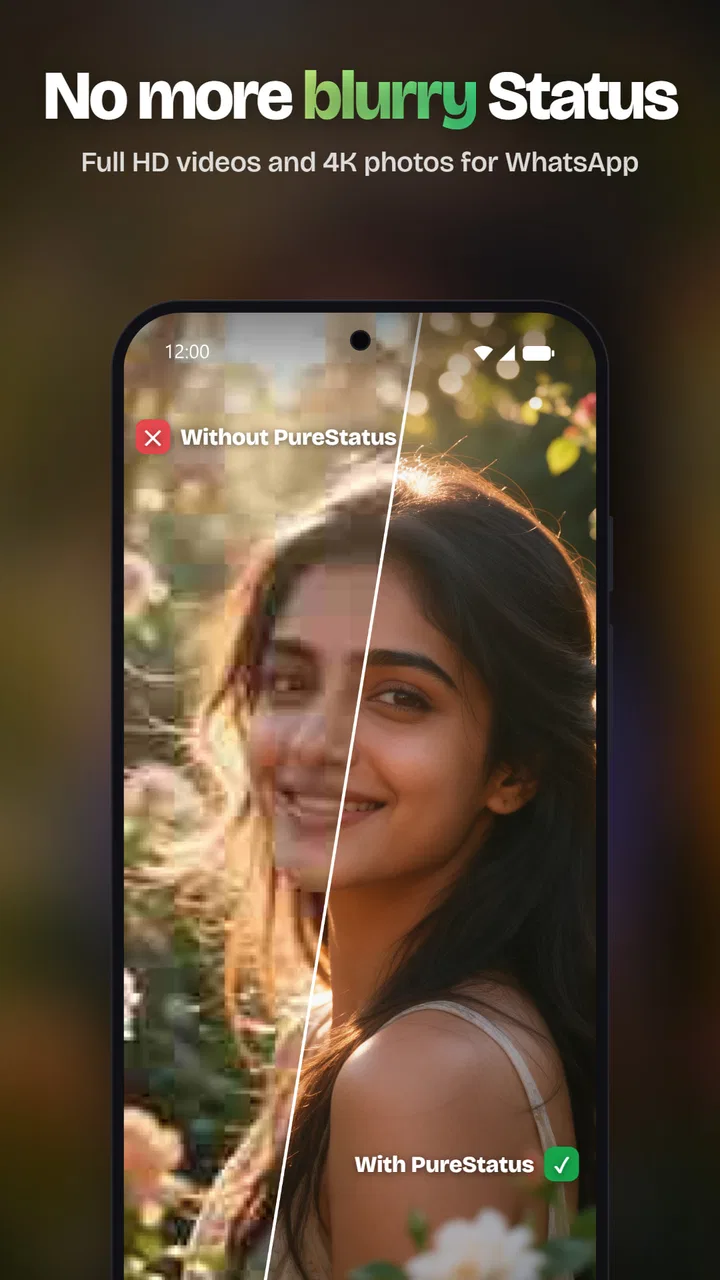
I first noticed PureStatus: ByeBye Blur Status because it focuses on a very specific annoyance: photos and videos that look sharp in the phone gallery but become visibly softer after being posted as a WhatsApp Status. Instead of presenting itself as a general video editor, it is built around sharing media through that particular route. In my experience, that narrow purpose makes it easier to understand than an overloaded editing suite, but it also means its value depends heavily on how often you use WhatsApp Status.
PureStatus is a free Android app from DamTech Designs in the video players and editors category. It is suitable for Everyone, works from Android 7.0 onward, and has reached more than five million installs. Its average score sits at 4.6 from roughly fifty-eight thousand ratings, which suggests that the basic problem it addresses is familiar to a large audience. The app first appeared on December 21, 2022, and the current version is 2026.12.
What PureStatus actually changes in a sharing workflow
The important distinction is that this is not primarily a tool for making a video more creative. I would not install it expecting a timeline editor, a full set of cinematic filters, or a replacement for a serious mobile production app. Its appeal is practical: prepare a photo or video for WhatsApp Status so the final shared result holds onto more of the original clarity instead of relying entirely on WhatsApp’s ordinary compression process.
You May Also Like

 Blood Strike: 2.5 Anniversary
Blood Strike’s Loadouts Turn Every Drop Into a Tactical Gamble
A close look at Blood Strike’s custom loadouts: how fast access to signature weapons reshapes its battle royale rhythm, rewards preparation, and narrows the gap between fights.

 Pandora - Music & Podcasts
Pandora’s Music Is Easy to Start, but Harder to Recover
Pandora’s strength is its low-effort path from a seed to a station. Its weak spot is how much confidence it asks you to place in connection, setup, and quiet recovery.

 8 Ball Pool
 Is Built on Rivalries, Rematches, and Routine
A close look at the rivalries, rematches, shared routines, and unanswered safety questions that turn a quick pool match into a persistent mobile community.

 Samsung Music
’s Quiet Strength Is Playing What You Already Own
Its reach comes less from spectacle than from dependable access to a personal library. That simplicity is both the app’s strongest retention engine and its ceiling.

 AccuWeather: Weather Radar
AccuWeather Review: A Quick, Clear Forecast for Everyday Decisions
For everyday plans, the best forecast is the one you can understand quickly. AccuWeather makes rain timing, radar, and local conditions easy to act on, with a few trade-offs.

 Hill Climb Racing
Why Hill Climb Racing Still Turns Crashes Into One More Run
A tiny car, a bumpy hill and one more upgrade: Hill Climb Racing keeps resurfacing because its simple chaos makes every near-miss feel personal.
More From Our News Desk



That makes the app useful for people who regularly share family moments, product clips, event announcements, travel scenes, or small business updates. A short clip recorded in good light can lose much of its impact when fine detail is softened. The same is true of an image containing text, such as a menu, timetable, invitation, or sale notice. In those cases, preserving legibility matters more than adding decoration.
My first recommendation is to treat PureStatus as a focused publishing step rather than as the place where you create the media. I would record and edit the original in the camera app or a dedicated editor, keep that master file untouched, and then use PureStatus only when preparing the copy intended for Status. This simple separation avoids a common mistake: repeatedly exporting and recompressing the same file before it reaches WhatsApp.
There is also a useful trade-off here. “No quality loss” is an attractive goal, but a sharing app cannot control every part of the route between the original file, its preparation, WhatsApp’s own processing, the viewer’s connection, and the display on another phone. I therefore judge PureStatus by whether it reduces avoidable degradation and gives me a cleaner handoff, not by expecting the posted media to remain identical to the camera original in every situation.
Where it fits better than ordinary alternatives
The usual alternative is to open WhatsApp, select a file, crop or trim it there, and publish immediately. That is faster, and for casual snapshots it may be all you need. The weakness is that the default route gives you little control over how the media is prepared before sharing. PureStatus is more appealing when the visual result matters enough to justify one extra step.
A second alternative is a full editor such as a timeline-based video application. Those tools are better when you need titles, music, transitions, color correction, layered clips, or detailed trimming. They can also introduce their own export decisions, which may create another quality compromise if the result is saved at an unsuitable size or bitrate. PureStatus makes more sense after that creative work is finished, when the remaining task is distribution rather than production.
There is a third option: manually resizing or converting media with a file utility. That can work for technically confident users, but it is less convenient for someone who simply wants to publish a clean Status update. The advantage of a purpose-built workflow is not necessarily that it offers endless controls; it is that it keeps the user focused on the destination.
A realistic everyday example
Imagine I have recorded a short video of a child’s school performance and want to share it with relatives through Status. The original contains small faces, stage lighting, and perhaps a banner in the background. I would keep the original safely stored, open the version intended for sharing in PureStatus, prepare it there, and then check the result before posting. If the banner is important, I would inspect the text at the edges rather than assuming the center of the frame tells me everything about final clarity.
For a small seller, the workflow is even more practical. I might film a new item, edit the clip in another app, export a clean master, and use PureStatus for the WhatsApp-facing copy. I would preview the entire clip, especially any price or product label, because a file can look fine in a thumbnail while details become difficult to read once viewed as a Status. This is one of the less obvious benefits of a dedicated sharing step: it encourages me to evaluate the media as a viewer will see it, not only as the creator sees it in the editor.
Three habits that make the app more useful
First, I would avoid using a screenshot or a screen recording as the source when the original photo or video is available. No sharing tool can restore detail that was already discarded by capturing the screen. Starting with the cleanest source gives PureStatus a fair chance to do its job.
Second, I would keep text away from the extreme edges of a frame. Even when a preparation tool handles the file well, the destination platform may display content differently across devices. A little breathing room protects captions, prices, and faces from becoming awkwardly cropped or visually cramped.
Third, I would compare the prepared copy with the untouched master before deleting anything. The practical question is not simply whether a file is smaller or easier to share; it is whether the important parts remain clear. For a landscape clip, that may mean distant detail. For a product image, it may mean lettering. For a portrait, it may mean skin texture and facial detail. The right choice depends on the purpose of the post.
Trust begins with visible choices
Because PureStatus handles personal photos and videos, I would pay attention to every screen that asks me to select, open, save, or share media. The safest routine is to choose only the specific files needed for the current Status rather than treating the whole gallery as one working folder. This is good privacy hygiene regardless of the app, and it keeps the workflow easier to audit later.
I also prefer to know exactly when the app is preparing a file and when WhatsApp is being opened for the final share. Those are separate moments with different responsibilities. PureStatus can prepare the media, but the final audience, caption, and publication decision remain mine. I would review the recipient-facing screen before tapping the final share control, particularly if the clip was intended for a limited audience rather than everyone who can view my Status.
The app’s free availability makes trying this workflow straightforward, although in-app purchases range from $3.99 to $64.99 per item. That is a meaningful point for anyone who dislikes unexpected upgrade prompts. I would read each purchase screen carefully and decide whether the free experience already solves my problem before paying for anything. A focused utility should earn its place through repeated use, not through pressure at the first launch.
PureStatus is also not the right place to make assumptions about account security or audience management. Those decisions belong to the WhatsApp account and its privacy controls. I would check who can view my Status, confirm whether a post is going to the intended audience, and avoid sharing sensitive documents or private images merely because the app makes the media easier to publish. Better visual quality is not the same as better privacy.
Data-sensitive moments deserve extra care
The most sensitive point in this kind of workflow is not only the final upload. It is the moment I grant access to media, browse folders, create a processed copy, or leave temporary files stored on the device. I would look at the Android permission prompt rather than accepting it automatically, and I would use the narrowest available choice that still lets me select the intended image or video. The exact options can depend on the Android version and device, so the important habit is to read the wording on my own phone.
I would also review the app’s privacy information before using it for confidential material. That is especially important for identity documents, private family recordings, unreleased business content, or anything showing a home address. I would not infer that an app is harmless simply because its purpose is only to prepare media, and I would not infer that it uploads files merely because it can share them. The responsible approach is to check the visible permission request, privacy notice, and system indicators, then decide what I am comfortable selecting.
For ordinary vacation photos or public promotional clips, this may feel like a lot of caution. For intimate or commercially sensitive media, it is worthwhile. I would create a separate, clearly named copy for sharing and remove unnecessary duplicates afterward if storage or privacy is a concern. That workflow also prevents accidentally posting the original high-resolution file when a smaller, purpose-prepared version is more appropriate.
Where the experience may frustrate you
The focused design can become a limitation if your needs change. Someone who wants to combine several clips, animate text, correct audio, remove background noise, or build a polished vertical story will still need another application. PureStatus should not be judged as though it were a complete editing studio; it is better understood as a specialist tool in a larger process.
There is also a quality-versus-size decision. A sharper file can take longer to process, occupy more storage, or use more mobile data when shared. If I am posting over a limited connection, I would consider whether every clip needs maximum clarity. A quick greeting recorded for a few close friends may not justify the same preparation as a product demonstration or an important event recording.
Another practical limitation is that the result still depends on the destination. If WhatsApp changes how it handles Status media, or if a viewer watches on a small, low-quality display, the improvement may be less noticeable. I would therefore avoid treating the app as a guarantee. Its strongest use case is reducing unnecessary loss before the platform receives the file, not overriding every later stage of delivery.
People who rarely use Status should probably skip it. If I post only occasional images and do not care about fine detail, the extra step may add friction without a visible payoff. Likewise, users who already have a dependable export workflow in a full editor may find that PureStatus duplicates part of what they already do. The app is most convincing for frequent Status publishers who have repeatedly noticed blur and want a simpler, destination-specific routine.
Who should try it, and how I would start
I would recommend giving it a fair test if you share vertical videos often, publish text-heavy images, run a small business through WhatsApp, or care about preserving detail in family and event clips. Start with a non-sensitive file that contains both fine detail and a broad subject. Prepare it, share it privately or with a limited audience, and compare it with the ordinary WhatsApp route. That gives you a more useful answer than relying on a generic promise.
I would not begin with a treasured original, a confidential document, or a large batch of media. Use one copy, inspect the app’s controls, pay attention to the save and share steps, and confirm where the prepared file goes. If the workflow feels transparent and the improvement is visible on the types of media you actually post, it may become a worthwhile part of your routine.
One question many users have is whether they need to edit inside PureStatus. My answer is no: I would use the right tool for each stage. Make creative changes in an editor designed for them, preserve a master, and use this app for the final WhatsApp-oriented preparation. Another common concern is whether the app replaces WhatsApp. It does not; the destination remains WhatsApp Status, so you still need to review the final audience and publication action there.
If you are wondering whether the free version is enough, I would test the exact workflow you need before considering an in-app purchase. Since paid items fall between $3.99 and $64.99, the sensible choice depends on what is actually unlocked on your device and whether you use the app frequently. I would never pay simply to chase a vague promise of better quality without comparing a real before-and-after result.
My cautious verdict is positive, with clear boundaries. PureStatus is a useful specialist app for people who want a cleaner route from a phone gallery to WhatsApp Status, and its strong user rating and broad install base show that the problem is not niche. I like the idea of keeping the sharing stage separate from creative editing, especially for text-heavy images and short promotional or family videos.
At the same time, I would keep expectations realistic. It cannot replace a full editor, cannot control every part of WhatsApp’s processing, and should not be treated as a shortcut around privacy decisions. The best results come from careful source selection, sensible copies, a preview of important details, and deliberate audience controls.
My recommendation is to try PureStatus when clarity on WhatsApp Status is a recurring problem, not merely because it is free. For the right user, it removes an irritating step from an everyday sharing workflow. For someone who posts rarely or wants advanced editing, the ordinary WhatsApp route or a dedicated editor will probably remain the better choice.
FAQs for PureStatus: ByeBye Blur Status
01What is PureStatus: ByeBye Blur Status used for?
PureStatus: ByeBye Blur Status is designed to help users save, view, and manage status updates without the blurred or compressed appearance that can occur in some messaging and social applications. After testing its main features, the app feels focused on improving the way status media is handled, particularly when you want to keep images or videos clearer before sharing or storing them.
02How does PureStatus: ByeBye Blur Status improve image and video quality?
The app attempts to preserve more visual detail by processing status images and videos instead of relying solely on the lower-quality preview shown in the original application. Results can vary depending on the source file, compression already applied by the messaging service, and your device. It cannot restore details that were permanently removed, but it may provide a cleaner result than a standard screenshot.
03Is PureStatus: ByeBye Blur Status free to download and use?
PureStatus: ByeBye Blur Status may be available as a free download, although some features can depend on advertising, usage limits, or optional in-app purchases. Before installing, check the current store listing for the exact pricing model, supported features, and subscription information. Availability and terms can change between Android and iOS, so users should review the details shown for their device.
04Does PureStatus: ByeBye Blur Status require access to my messages or personal files?
The app may request permission to access photos, videos, storage, or media selected for processing. These permissions are relevant to its basic function, but you should still review each request carefully and grant only the access needed. Avoid providing broader permissions if they are not necessary, and check the developer’s privacy policy to understand how imported media and any collected information are handled.
05Is it safe and legal to save or share status updates with PureStatus?
The app can be useful for handling status media, but saving or redistributing someone else’s photos and videos may involve privacy, copyright, or platform-rules concerns. Always respect the original creator’s permission and avoid sharing personal content without consent. PureStatus does not change your responsibility for how saved media is used, and its availability or behavior may depend on updates to the original messaging service.
Pros
- Removes blur from supported status images and videos quickly.
- Simple interface with minimal setup required.
- Useful for viewing clearer media shared through messaging apps.
- Lightweight installation with modest storage requirements.
- Works well for users who prefer a focused
- single-purpose utility.
Cons
- Cannot restore details that were permanently removed or heavily obscured.
- Results vary depending on the original media quality.
- May require access to photos
- videos
- or shared media on your device.
- Some features may be limited by Android or app privacy restrictions.
- Unclear results can make it difficult to judge output before saving.

PureStatus: ByeBye Blur Status
Gallery